Editing Tools

You need to edit before you publish, but where do you start?

Staring at a freshly minted wall of words can be daunting. Before you send your masterpiece into the world, it is important to proofread and edit it. And yet getting started, going through every sentence with a fine-toothed comb, and cleaning up your piece is difficult. Wouldn’t it be easier to just click “Publish” and be done with it?

Please don’t do that. There are a number of ways to make editing your piece easier. Here are a few of the ones I turn to before I send my creation out into the world.

Noboddy wants to have a tpyo or a mispelled word distracting readers from their message.

Let it Settle

A laptop with a black screen next to a cup of coffee and a plant

Pulling out a red pen and attacking your creation the second it is done isn’t a good idea. Give yourself some time to distance yourself from your work. When it is new, it is too familiar and sometimes too precious to look at critically.

Besides, you did a great job. You deserve a break.

Right now it’s time to turn off the screen, get some coffee, and relax. Take a short walk, get a snack, or even start writing another piece. Let your mind settle on something else for a bit. Whether it takes a few minutes or a few days, a break can help you clear your mind and look at your piece more critically.

Print It Out

Colored pens against a page of text with editing marks

Sometimes my eyes just slip when I try to look things over on a screen. I can’t quite see what’s wrong, and everything blends together into a wall of words. When that happens, the best option may be to print it out and whip out a real red pen to mark edits.

Maybe not red, per se. I am partial to pink and purple pens too. The ink stands out without making me feel as though I’m back in high school getting back an exam I forgot to study for. Pretty, friendly, and still effective.

Read it out loud

woman with blue and white booklet obscuring her face

You know what you meant. Of course you do, you wrote it down. It makes perfect sense, just ask anyone!

At least, it sounded sensible in your head. Sometimes it takes hearing something out loud to realize that it doesn’t flow the way you imagined.

Go ahead, read it out loud.

Nobody has to hear what you’re reading. Close the door, speak just loud enough for you to hear. If you used another tool such as Hemingway, test out the sentences that were highlighted as too “hard to read.” Maybe the app is right, and maybe not, but it is a good way to test it out.

EditMinion
EditMinion Strunk logo

EditMinion is a robotic copy editor. Some of the features include searching out adverbs, passive voice, weak word choices, and alternatives for “said.” Depending on what you are editing, you can toggle these tools on and off to find what matters to you.

The metrics at the bottom give you an excellent at-a-glance look at your work. Have you used the word “indeed” 58 times? Is one of your sentences 82 words long? And which one is that anyway? All of this information and more is presented in a simple report that gives you an overall look at the piece. Scanning through the text, you’ll see highlighted areas marking the problematic words and phrases mentioned in that report.

EditMinion helps make editing less daunting by adding some cute A collection of fun options allows you to identify words originally coined by Shakespeare, of Latin, Greek, or Germanic origin, or pull up writing tips from Ambrose Bierce’s 1909 book Write it Right. Last but certainly not least, this tool has an adorable monster mascot named Strunk. You can imagine him looking over your work and helping you improve things.

Hemingway
Hemingway app logo

Much like editMinion, the Hemingway app is a robotic editing tool. It uses an array of colors to bring attention to common issues such as long and complex sentences, adverb usage, and passive voice. It won’t help you find typos, but it does allow you to quickly see problematic areas and clean them up.

The bright colors highlighting various types of issues make it easy to see where issues may lie. A large typeface and the ability to format your text makes it a convenient and approachable tool. A readability score in the upper righthand corner helps to identify if your overall writing is too dense or too simple for your target audience. (Most United States adult read at about a 9th-grade level, according to an article in the Plain Language at Work Newsletter.)

Remember that this is only a tool to help you edit, and not all of its flags are helpful or correct. Because of the namesake author’s minimalist approach to his writing, you may find complex sentences are marked as “very hard to read.” If you’re editing a casual piece of writing, it’s nothing to worry about. If it’s something a bit more academic, you might find it paints a lot of your writing a faded red.

Grammarly

Grammarly Logo

Grammarly is an automated grammar checker. It sits politely in the lower right corner of your screen, alerting you to any errors it detects. A small red circle in the lower right-hand corner will keep track of how many issues are detected. Misspelled words and comma abuse get a small red underline. Hovering over that line brings up suggestions for fixing or improving the mistake.

Similar to the little red squiggle in Microsoft Word that appeared every time I wrote my name in elementary school, it alerts you to any errors it sees as you compose them. Unlike the red squiggle, it is available almost anywhere you type—including Microsoft Word itself. (There are a few places that it doesn’t work, most notably Google Docs.)

If you want a more detailed analysis of your mistakes, there is a premium subscription option. So far, I haven’t found a subscription necessary, but I do like the convenience of the tool following me around the internet and politely suggesting improvements. It is also fun to get weekly emails telling me exactly how much I’ve written, how many errors I made, and how varied my vocabulary usage was.


There are so many tools and tips out there for how to edit your work. Have you tried any of the ones I listed? Did I miss your favorite? Tell me about it in the comments.

10 Ways to Break Through Writer’s Block

image of typewriter keys overlaid with the words "10 Ways to Break Through Writer's Block"

Are you suffering from writer’s block?

Writers don’t like admitting they get stuck, and as a professional writer, there isn’t time to wait for inspiration when deadlines have been set. Keeping up with a social media campaign, blog posts, reviews, press releases, website creation, or any other project I might find on my plate

Honestly, I get stuck a lot. The trick is not admitting it (whoops) and finding a way to power through.  Some days, one trick will work better than another to get me back on track. For that reason, I have a variety of tricks and tools I can pull out when I find myself in need.

1.) Turn off your Inner Editor

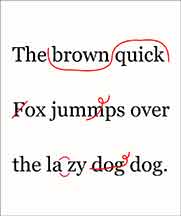
red editing marks overlaid on the text "the quick brown fox jumps over the lazy dog."

I admit to getting stuck trying to find the perfect words from time to time. We all do it. Everything must be just right. Your name is attached to it, after all, so it is representing you to all the world.

Well, yes, but only if you get it done.

Sometimes it’s best to stop worrying over how good or bad your writing is. If you’re constantly agonizing over finding the right phrase, the best wording, the perfect structure, you aren’t going anywhere. You may even be using this as an excuse to procrastinate.

Nobody is perfect, and no draft will be great. Many famous authors agree, including Arnold Samuelson, Bernard Malamud, and, of course, Ernest Hemingway. “The first draft of anything is sh#t,” said Hemingway. A blunt but correct observation.

Just type out anything. Anything at all. Right now. Get that first draft done. Once you have a completed project, you can start going in and editing. Until then, the little voice inside you that insists that isn’t right, that needs fixing, you should improve that needs to be pushed aside.

It doesn’t have to be good. It has to be done. You can clean it up afterward. You don’t polish a chair before you finish building it. You don’t edit until you have a completed draft. And voila, you broke through your writer’s block.

2.) Use Rewards

three types of chocolate truffles

Whether a big treat or small rewards given after reaching certain milestones, I find dangling a carrot in front of myself works wonders for getting my writing done. Usually I aim for food-based items: A small treat like a chocolate or two; or something bigger, like an obnoxious barely-counts-as-a-coffee concoction from Starbucks or an ice cream.

Set a goal, either time or word count, and once you have reached it, indulge. It’s that simple.

For the sake of waistlines, this tool should be used in moderation. At least, if you’re using snacks as your reward.

3.) Walk Away

feet walking down the sidewalk away from the viewer.

I’m not saying you should abandon your work. I’m suggesting you take a 20-minute walk, or a bath, or do something physical. Take yourself away from the keyboard and get moving. You’ll give yourself time to process the project without agonizing over it, and it’s healthy for you. Work out your stress, give yourself a break, and then come back to your writing fresh.

4.) Written? Kitten!

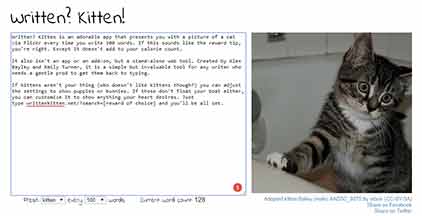
Written? Kitten! website screenshot. A portion of this blog post's text has been inserted into a textbox on the left and an image of a kitten is on the right.

Written? Kitten is an adorable app that presents you with a picture of a cat via Flickr every time you write 100 words. If this sounds like the reward tip, you’re right. Except it doesn’t add to your calorie count.

It also isn’t an app or an add-on, but a stand-alone web tool. Created by Alex Bayley and Emily Turner, it is a simple but invaluable tool for any writer who needs a gentle prod to get them back to typing.

If kittens aren’t your thing (who doesn’t like kittens though?) you can adjust the settings to show puppies or bunnies. If those don’t float your boat either, you can customize it to show anything your heart desires. Just type writtenkitten.net/?search=[reward of choice] and you’ll be all set.

5.) Write or Die

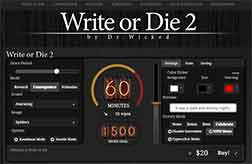
write or die 2 website screenshot

If Written? Kitten isn’t hardcore enough for you, give Write or Die a try. There is both an online option for free and an app available for purchase. Write or Die offers varying levels of punishment for not reaching your goals, from annoying sounds and lights to deleting the work one character at a time if you start to slack off.

While purchasing the application will give you many more functions, the online version offers a powerful motivator to get yourself writing as though your life depended upon it.

6.) Work on Something Else

hands typing on a laptop. A phone and pamphlet are on the desk.

You probably have more than one thing that needs to be done right now. If you’re stuck, it’s time to move on. Set aside the project that is blocking you and plow through the next thing on your agenda. Even if you aren’t a writer, I guarantee you have something else you need to write.

And once you do, you’ll have finished something. Now who has writer’s block? Not you.

7.) Brainstorm

excerpt from an essay outline template.

Do you remember those writing exercises from when you were in school, where you’d have to turn in an outline before you were allowed to turn in an essay? Or creating a word web that ended up looking like a globular spider alien? Or just discussing ideas with other classmates before getting to work?

Those exercises can be useful in the real world. By creating a framework and gathering your thoughts, you’re setting yourself up for success. Much like having a road map, you know where you’re going and can get there with less of a struggle.

Sometimes they can even help you see things in a different light. That breakthrough moment can help push you past any kind of block. If it’s a big enough insight, you may find it hard to stop writing.

8.) 15 Minutes of Research

an open book in someone's hands.

Maybe you aren’t quite sure how something works, or feel like some facts are eluding you. If only you had a bit more information, something more concrete, maybe then you would be able to create something wonderful.

If I’m in that situation, I use a technique I learned while doing National Novel Writing Month. Rather than fretting over getting an encyclopedic understanding of my subject, I indulge in fifteen minutes of research on the subject. Whether it is a web search or skimming through a book, I can gather any information on the subject I want.

Once that fifteen minutes is up, it is time to write. There are several reasons for this. First, obviously, is to get back to writing. Second, it prevents falling down a rabbit hole of interesting articles and procrastination. The ideas is to gather some facts to get the creative juices flowing again, not distract yourself from doing the writing.

You can go back into a more in-depth research session once you finish that draft. In the meantime, if there is anything that you didn’t find enough information on, you can put a placeholder there and move on with your piece. Once you get to the editing stage, you can replace [[QUOTE BY EXPERT ON SUBJECT]] with the actual line you were looking for.

9.) Make It A Game

banner for The Sprint Shack website.

Nothing motivates me more than the need to outdo someone else in a friendly competition. If you can, challenge someone to a “word sprint” or “word war.” Set a time limit and see who can write the most within that period of time. That’s all there is to it.

Don’t know anyone offhand who might want to play? Not to worry. Put out a call on social media, or search for your own. Hashtags like #wordsprint, #writingsprint, #wordgrab, and #wordscrim can help you find other writers to play against.

You can also check the SprintShack website for more resources and a community built by and for writers looking to participate in this kind of friendly competition. Check out their Celebrations Bundle, a collection of downloadable resources for writers.

10.) Block Out Distractions

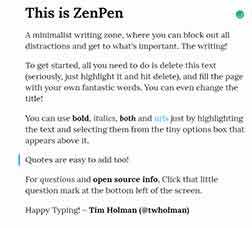
a screenshot of the ZenPen website

Close that Facebook tab. Turn off the television. Put your phone into airplane mode. Turn on whatever music inspires you without distracting you, set a glass of water or tea next to you, and start writing. Stop allowing anything and everything to distract you.

Having trouble? Try a tool like ZenPen. It’s an online tool that blocks out distractions and gives you a clean, quiet environment for writing. Other options include OmmWriter, ZenWriter, or FocusWriter. There are many tools like this out there, so find one that works for you and block out all those distractions when you really need to.


Do you have any techniques to help you break through writer’s block? Have you tried any of these and found they helped you out? I’d love to hear about it. Leave me a comment and tell me what you think!

How to Create Your Own Written Agreement

A hand signing a contract, overlaid with the words, "How to Create Your Own Written Agreement"

You know you need a contract.

But writing one is an intimidating prospect. Where do you start? What do you need to say? Does it need to have that certain “official” sound to work? A contract is kind of formal, so is there a more casual option?

In response to those questions: You start at the beginning; you need to lay out what you expect to give and receive from this arrangement; you can write it however you like, “official” sounding or not; and yes, there is a more casual option. It’s called a letter of agreement and I use it for most of my transactions.

Get Started

There are many different templates and guides out there for creating a written agreement, be it a letter of an agreement or a contract. Even with that, it can be intimidating, even overwhelming to create your own. Worse, since each agreement will be different, you’ll need to write up a new one each time.

Or will you? You’ll need to change the details, but once you know the general terms you’re comfortable working with, you have a template of your own. Not only does that save you from seeking out the right phrasing for your agreement, but it will make sure you know and can explain exactly what you are expecting to give and receive during your relationship with a client. That means you have the makings of an elevator pitch.

That’s right. Having a written agreement template can help you land a gig before the word “agreement” is mentioned. It gives you a clear idea of what you’re offering. That allows you to explain your proposition in simple terms, rather than rambling and talking in circles. You can refine your pitch, impress more people, and land more clients this way.

But how do you do it? There is no need to write in “legalese.” You can even add in some humor. Whatever you’re comfortable with. After all, entering into an agreement means you are creating a relationship with this person. You want that relationship to be comfortable. So long as the terms are laid out clearly, you should be fine.

I’ve broken down my letter of agreement template to help you create your own. It’s not a template, but a guideline. If there is enough interest, I will create a PDF template that you can modify on your own in the future.

Who is involved?

Whether you choose a formal contract or the more casual letter of agreement, you’ll want to make sure each party is identified. Since my agreements are all done online, I put all of the client’s information at the top, but save my information for the signature block. Here’s what the beginning of the letter looks like.

[date]
Mr./Ms. [client name]
[client role]
[Company name]

Dear [client name]:

The purpose of this letter of agreement is to outline the scope of the writing services that [your name/company] will perform for [company].

What and When

Next we need to know how long the agreement will last, what will cause it to terminate, and what is going to happen within that time frame.

To make it easy to read and find the information you need, I recommend splitting things into sections. Even if it is structured as a letter, putting a heading on each section is a great way to keep things organized. Both you and your client will be able to find information at a glance, and it makes things look professional.

Some of my section titles include:

  • Term
  • Services to Be Rendered
  • Timeline
  • Fee
  • Terms of Payment
  • Services to Be Rendered


Keep a Copy For Your Records

Once you’ve laid out the terms of your agreement, you need to make sure that your client is on the same page as you. If you’re meeting in person, you can discuss any questions or objections they have at that time. If you’re working online, I find it good practice to write in a reminder that any issues need to be sorted before they sign. You also want to remind them to keep a copy, and you’ll want to put your copy somewhere safe, so that you can quickly refer to the document if needed.

Sign Here

Put your name on the line, and we’re done! Unless, of course, you don’t have a pen and paper handy. How do you get a digital signature from your client?

There are several ways to accomplish this, including plugins and tools that can be downloaded or purchased to create a digital signature box.

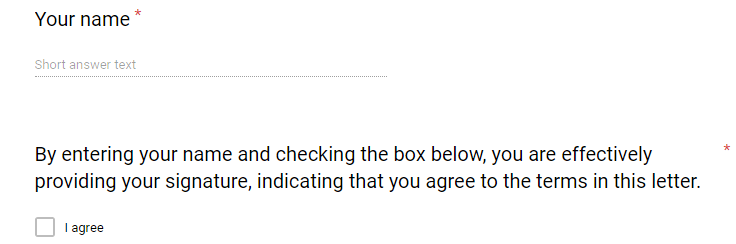
I’m a big fan of Google Drive, which has a variety of tools for doing business online but does not offer a simple way to insert a signature block. So how do I get around that? I have a two step “signature” at the bottom of the form.  The client types in their name, then checks a box that explains this action is effectively providing a signature, just as if they’d pulled out a pen and scribbled their autograph on the line. It looks like this:

a text box requesting a name and explaining that checking a box is equivalent to legally signing the document.

You’re All Set

Now you have the tools you need to create your own contract or letter of agreement. You don’t have to rely on handshakes and have a clear description of what you will and will not be doing for your client. You’ll have a way out if things go wrong. You’ll know how and when to get paid. Your client will know what you expect of them and what they’ll be receiving.

And you didn’t have to hire a lawyer or go into scary legalese writing.

If you have any questions, want to know more about how I set up my own letters of agreement, or want me to put together a downloadable PDF template for you to use in making your own, let me know. I’d love to hear from you.

Protect Yourself from Nonsense

An image of a bear growling in another bear's face, overlaid with the words "Protect yourself from nonsense."

I just walked away from a job offer. The CEO of the company tried to change the parameters of the job, offering me freelance instead of part time employment. It was the last in a long list of red flags for the position. It wasn’t easy, but I did stand my ground against nonsense.

When I told a friend about the experience, he said, “You’re a lot braver than I am with that stuff. I wouldn’t have stood up against that. You’re really strong.”

I never thought of it like that. I felt good that he thought I was strong, but why did he think it was so remarkable that I said, “no thanks,” to a bad deal?

Whether you’re just starting out or you’ve been working for a long time, you know there are people out there who are just plain not nice. You know what I mean. People who cheat, lie, manipulate, and steal from you. There are people who refuse to listen to reason, who are chronically late, or indecisive, or any number of other things that can really put a hamper on your working relationship.

All of these people can be simply categorized under the title of “bad customer.” In the service industry, these are the kind of people who think bullying inexperienced teenagers in order to get free rewards is acceptable behavior. It’s hard to escape them in that situation. However, in the creative industries, including digital marketing, there are ways to protect yourself from nonsense.

You need a contract

Whenever you make an agreement with someone, make sure you get it in writing. No matter how well you know the person, how well recommended they came, or how small the project you do for them is going to be, a clear outline of what is expected of each party is a must.

A contract protects you. Your client has a written list of what you are going to provide, when it will arrive,  what it will cost, and what will cause the agreement to come to an end. They also know what expectations they have to meet, and when.

Beyond a list of responsibilities, a contract provides other protections and benefits. It’s a legal document. If the terms of the contract aren’t met, you have legal recourse. A contract binds the parties to their duties, ensures you get paid, and gives you the framework for ending the relationship if things deteriorate between the parties.

If you feel a contract is too formal, consider a letter of agreement. This also provides a framework for the relationship, outlining the duties of each party as well as when and how things are due.

If you’re stuck for how to write a contract or a letter of agreement, there are plenty of examples and templates available online. Rocket Lawyer has a tool that can help you create one of your own without any hassle. It prompts you for information and formulates a full document for you.

You need to get paid

It is far too easy to believe that you will be paid fairly upon delivery of your work to your client. Sadly, there are too many people who will take advantage of your trust in them and walk off without giving you proper compensation.

You don’t work for free. The entire concept of “exposure as payment” is horrendous and insulting. Exposure does not pay your bills. Make sure your client knows up front that this will be a monetary transaction. (There are exceptions to this, such as giving a free sample of your work to land a big client (which I’ve never tried) or building up your portfolio (which I have), but this is the rule of thumb you should keep in mind during normal situations.)

You Need to Get What You’re Worth

Now that we’ve established that you’re getting paid for your work, make sure it’s fair. Please do not to underprice yourself.

Offering underpriced work will your brand. If “you get what you pay for” is true, a very low price for your work gives the impression that you aren’t capable of producing high-quality results. Pricing yourself properly will not only drive away people looking to take advantage of your inexperience, it makes you appear more confident and more capable of delivering what you are promising.

No matter how new you are to the field, do not fall into the trap of undercutting your value to entice customers and clients. The number of people who severely underprice themselves in order to entice customers is astounding. A quick search on social media sites like Tumblr for commission work reveals hundreds of posts advertising work for only a few dollars. This doesn’t just hurt the person taking the commissions. It creates the false illusion to customers that they should not have to pay a fair rate to the people they hire.

If you wouldn’t work in a fast food restaurant for less than minimum wage, why would you do specialized creative work for less?

If you’re not sure how much to charge, there are a lot of different strategies you can use to figure it out. Most freelance work is charged by project, rather than by hours, but you can still factor in an hourly rate to help you determine your rates. For example, I know I won’t work a service industry job for less than $13/hour (and I really don’t think it should be that low). If I know it takes me two days of work to create a website for a client, that’s roughly 16 hours. That comes to $208. From there, you can realistically adjust things to your liking. Make sure you compare it to other people in your industry as well, to ensure you’re not wildly above or below the standard.

If an hourly rate is how you want to go, you can implement tools like Cash Clock to show exactly how much you are earning and charge your clients for the work you do.

Once you’re comfortable with your work and have established a relationship with a customer, you can consider the benefits of creating a loyalty discount or some other means of keeping your prices down. But don’t do this for everyone who comes along, and don’t lower your prices just because someone complains or tries to convince you that you should accept less.

Ask for what you’re worth. This is not a negotiation. If they don’t like your prices, they can get crummy work off Fiverr.

You Need Respect

I keep going back to the service industry as an example, partly because I work in it for my day job, and partly because working with clients means you are a part of it, albeit not in the traditional sense. You know those signs that say, “We reserve the right to refuse service to anyone”? That’s a warning to people who are going to cause trouble that they can and will be removed.

No matter what is going on, you and your client should be able to enjoy a professional and polite interaction. If that isn’t possible, please remember that you also have the right to refuse service. Set up parameters of what you will and will not do early on, and stick to your guns if they try to make you change this.

You can fire a bad client, just as they can fire you. There is no project so important that you should tolerate being treated as less than a human being. Other opportunities will come. Stand up for yourself and confidently say, “No,” to bad behavior.

Screaming, bullying, manipulation, lying, gaslighting, threats, ignoring you; the list of things I have seen and heard people complain about in their clients is a mile long. I used to allow it to happen to me, and it was never worth the stress and heartache I went through. I downplayed my skills, telling myself I needed the experience and it would get better if I stuck it out. I did learn things, but a lot of what I learned was that I should not allow that to happen to me ever again. It was stressful, to the point of being unhealthy, and the benefits definitely did not outweigh the downsides.

The client needs your skills. You put in time and effort to learn how to do things that other people can’t. Your talents and time are worth someone investing in your, and your being a human being accords you certain rights, including respect from fellow humans. Demand your rights, and politely but firmly decline to work with anyone who will not grant them to you.

This post only scratches the surface of the matter, and I am sure I’ll be revisiting this topic in the future. There’s no reason you should have to deal with badly behaved people who try to devalue you. There will always be good clients and bad, but at least try to protect yourself from the nonsense that some will try to pull. Get things in writing, stand your ground, and be prepared to walk away if things are not tolerable.


Plan Ahead

plan-ahead.jpg

I would like to say that I followed my own advice and had this post ready to go weeks ago. Alas, I let myself slip and now I’m scrambling to pull a readable article together in time for my regular Monday posting….a week late. It would have been on time, except things came up that I needed to attend to, and then I felt ill, and…well, you know. These things happen. Now I’m behind on my schedule.

That makes me one of the countless people who don’t keep up with a regular content schedule. It’s one of the chief contributing factors to failed blogs and social media campaigns. Once your routine falls out of rhythm, or worse, if you don’t have one at all, things can quickly pile up and become overwhelming.

So you have to create awesome, eye catching, engaging content. You have to do it without eating up all of your time. You have to put it out there on a consistent basis.

How do you stay on top of this?

Brainstorm

If you have ideas ready to go, it’s a lot easier to create things when the time comes.

Set aside time to brainstorm a set of ideas that would make great content. You don’t have to use all of them. This is a time for generating ideas, not judging them. Your inner editor can be unleashed once there is enough fodder on the page to satiate it. Right now it is quantity you’re looking for, not quality. There will be time to pare down your ideas later on.

You might find you have a lot of good ideas lurking in the corners of your mind. You may also find them to be elusive and quite good at hiding unnoticed in those corners. Worse, you may discover you can’t come up with any ideas.

Fear not! If you find yourself staring at a blank page (or screen), there is no shame in reaching out for help. Using a system or tool developed by someone else can give you the starting point and structure you need to generate  You can use a system like this one from HubSpot for generating content ideas. You can try using a new technique, such as word association, mind mapping, or word banks. Use tools like Quora and the predictive search function of Google to learn what questions your audience wants answered. If all else fails, look at what others have created and build your own ideas from there.

Create an editorial calendar

Planning ahead means knowing when things will happen. Creating an editorial calendar will help you to see into the future, and keep your content tied together and on topic. Your campaigns can be tracked, and you will have a written reminder for what needs to be done and when.

Editorial calendars help keep you consistent. There are many different options available online, both free and paid. WordPress users can install an editorial calendar plugin.

Consider the benefits of a pen-and-paper calendar when you’re looking. According to a 2014 study conducted by Pam Mueller of Princeton University and Daniel Oppenheimer of UCLA, writing by hand helps you remember things better than typing them up.

The other benefit of creating an editorial calendar is having a visual representation of how much of a buffer zone you have, just in case something does come up that throws your schedule off. By setting up your work ahead of time and knowing where you are going, you avoid the headache of trying to catch up and fit things as things continue. I recommend having no less than a two week buffer period, although I strongly recommend having more if you can.

Adoptables

I use the term “adoptable” as a label for content that I’ve created that can be slipped in whenever and wherever I need it. It is “adopted” into my current project. When I worked for a marketing agency, I saved posts and pages from projects that did not make the cut for the final result for one client’s campaign. These weren’t poor quality pieces, mind you. Sometimes the contract would be terminated early, or the direction of the project would change, or some other strange thing would happen that would render the content moot. Rather than scrap them entirely, I saved the pieces for a rainy day.

When a new client came along with a similar project, I had a set of content I could quickly update and adapt to fit into their campaigns. I saved time and effort and extended my buffer period for these projects.

For your own projects, adoptables can be content that you hold in waiting for when the time is right. Didn’t have time to write a blog post this week? Bam, adoptable post, all ready to go.


Repurpose content across channels

You post to multiple online sources. You’ve got emails, newsletters, blog updates, Instagram photos, Facebook posts, Tweets, pins, and so much more. Each of those outlets has different strengths and drawbacks, and each one draws a different audience.

Repurposing content can help you reach a broader audience without having to start from scratch for each project. Blog posts can become podcasts or videos, or be used to create an ebook. Photos can be inserted almost anywhere, saving you from having to find the right stock image or create new graphics. Frequently answered questions from support channels or answers you have supplied on Quora or other sites can become the basis for blog posts.

The possibilities for repurposing content are almost endless. Be creative, and use what you have to create something new and engaging.

Use management tools

If you are spending a lot of time on social media, there are a host of management tools available to make life easier. Facebook has a built-in scheduling ability allowing page managers to determine when content should be shown to their audience. Twitter has a built-in analytics tool, which can help you determine which content is performing well so you know what to make more of.

A more comprehensive approach might be to use a full social media management platform, such as Buffer or Hootsuite. Both of these tools are powerful allies in the battle to stay on top of things. You can create posts across multiple channels, schedule them, review feeds, comment and interact with audiences, and create analytics reports, all from one place. Each one offers a free plan as well as several paid packages, so it is worth playing with both options to decide which one works best for you.

You can also cross-post your content. Tools like If This, Then That (IFTTT) allow you to send things out across multiple channels without spending a lot of time or effort. For example, you can set up a recipe so that if a post is sent to Instagram, it should be shared across all other social media platforms you are using.

Realize mistakes happen

Nobody is perfect. There is going to come a time when you make a mistake, lose track of time, or simply need to push a project to the side to make room for a bigger priority. It happens.

When it does, don’t worry. This is not the end of the world and it can be fixed. Take a deep breath, apologize if you need to, and get back on track. If you’re not already using some of the suggestions I made here for planning ahead, now is the time to choose at least one and make a point of implementing it.

I’m still not feeling my best, but at least I’m back on track with my posting. In between resting with a giant mug of tea on hand and my other obligations, I’m going to sit myself down, follow my own advice, and create a calendar so I know what I’m posting and when. I may even create a buffer post and hide it in my adoptables file.

Do you have suggestions for planning ahead and staying on track with your content schedule? I’d love to hear it. Share your ideas with me and everyone else by leaving a comment below.

You Need to Pick a Theme

Photo of jumbled puzzle pieces. The words "You need to pick a theme" are overlaid in white.

A Focus for your Content

No matter what you’re working on, a coherent theme will tie it together and help keep it focused. I’m not referring to a nice layout and color scheme or anything like that, although those are important too. I’m talking about a focus for your content.

If you go to a site called The Great Shoe Emporium, you’ve got a pretty good idea of what you’ll find there: shoes.

If you see photos of pet fish and brunch outings on that shoe site, you will be confused. Maybe you went to the wrong place, or perhaps the site was hacked? Maybe they just don’t really know what they’re doing. After all, if they’ve got a collection of irrelevant things on their site and don’t take the time to curate, they might put the same effort into their products or services.

Picking a theme helps keep you focused and increases your value and usefulness to your audience. You’re not publishing just for the sake of putting content out there or searching around for the right things to capture attention, so you can concentrate on producing high-quality content. Theming helps you present yourself as an authoritative resource on a topic, allowing you to grow your audience, keeps search engine algorithms happy, and allows you to expand more in a field which already interests you. In short, choosing a theme is a win for everyone.

Don’t Fence Yourself In

I’m not saying that there can’t be some variety in your content. There is nothing wrong with having a collection of things you’re interested in tied into your overall theme. There can be different branches to your content that allow you to explore different things while still keeping relevant.

A fantastic example of this would be podcasts like RadioLab. The overarching theme is exploring science, creating documentaries with stories, sound, and information to teach people answers to questions they may never have thought to ask. This theme doesn’t restrict them. Rather, it helps create a framework for consistently delivering engaging and informative shows. It’s been working for them for 15 years. (It’s working for me right now. If you haven’t listened to RadioLab, you are missing out!)

Explore the Limits

You definitely don’t need a broad focus to your theme to make it work. But what if your brand’s theme feels a bit too tightly focused to keep things interesting? I interned for a company selling root beer and creme soda. On the outset, it looked like a one-and-done subject. It took some creativity, and it took building in “sub-themes” to make it work, but there was more than met the eye with that subject. I created a weekly recipe feature, I wrote up the history of the drink, the ingredients, learned more about root beer than anyone needs to know. And it was awesome. We gained audience, and I found out that I could make something that seemed fairly limited and blasé into something that I enjoyed and could make other people enjoy.

All these years later, I’m still into root beer. Not only was I successful in growing an audience and expanding our sales, I gave myself a new interest.

If you’re still not sure about keeping things to a strict theme, consider the benefits of a “personal blog” to collect everything that catches your fancy without distracting from your topic. You can also subcategorize things, making it easy for specific parts of your audience to navigate to what drew them to you. There’s a place for all the photos of your fish, discussions about your bad date, and vacation photos. If you’re working on a personal brand, that place isn’t on a forward-facing site or blog that represents you. Keep things separate and you’ll make things easier and more successful for yourself.

So how do you know you have a winning theme? You can sum up what you’re putting out in a sentence or two. That’s right, I’m bringing up the advice about elevator pitches you’ve seen touted everywhere.  It’s true though; if you can say what you’re doing in a few words, people understand and know if you are offering what they want. You’ll also be able to keep yourself on track.

Going back to that first example I used, if you’re running a page for the Great Shoe Emporium, your theme might be “Information on footwear and fashion.” So, when you took all those cute photos of Bubbles the betta fish that you want to share, you know you should save them for some other venue. Bubbles neither wears shoes nor understands fashion, and a pet is not a fashion statement. You keep your content relevant, and everyone is happy.

If you’re not sure how to choose a theme for your content, or you have any other questions, feel free to reach out to me in the comments. If you’re looking for something a bit more in-depth or hands-on, you can also reach me via my Contact page.

Please Don’t Say That

A stop sign with the words "please don't say that" superimposed over it

There are words that show up in practically every ad you see or hear.

They’re so ubiquitous, they don’t mean anything any more.

Remember how in middle school you were taught not to use clichés anymore? These words have the same issue. They don’t carry any weight because they’re overused. If these words were horses, there would be a graveyard of equine bodies being brutalized every day. (See what I did there? Sorry.)

Which words are these? I’m glad you asked.

Iconic

State-of-the-art

Advanced

Unique

Revolutionary

Oh, I hear you say. Those words.

Yes, exactly. Those words. I guarantee you thought of at least one or two ads off the top of your head using one of those words. And you don’t pay any attention to them at all. They might sound good, but they don’t give any information and don’t do much to capture the attention of an audience.

There’s a name for what’s happened: semantic saturation. The words have lost their meaning from overuse, and they are just so much noise.

There are possibly over a million words in the English language, with roughly 500,000 showing up in a comprehensive dictionary, such as The Oxford English Dictionary, Second Edition or Webster’s Third New International Dictionary, Unabridged (source).

With that many choices available, why keep dragging out the same old exhausted terms out? Say what you mean and keep your copy fresh.

(This message brought to you by the Council Against Abuse of Words.)

What’s the big deal about blogging?

Scrabble tiles that read "blog." Over the image are the words "What's the big deal about blogging?"It seems appropriate to start this blog with a post about starting a blog. After all, that’s one of the things I’m supposed to be good at doing.

So what’s the big deal about blogging?

When I first started blogging, it was at the request of a friend who had us email what were essentially diary entries to him to be uploaded to his early 2000’s website. I don’t remember if I wrote three or four posts before I lost interest. It took me many years to figure out that a blog can be more than a glorified diary.

When I started my social media internship back in 2014, keeping up a company blog seemed like a waste of time. After all, Facebook and Twitter and Instagram were the shiny new toys I had been training to use. Pictures and short bursts of text and creating a community. Websites were interesting, but back then I didn’t know much about building them. I was asked to put together a few blog posts near the end of my stint there. I did, but the reason behind it remained a mystery.

Years later, I did learn what the point of business blogging was. In fact, there are a lot of points in its favor.

Build a Relationship with Customers

If you’re putting out content for your audience, you’re making yourself a resource to them. Rather than spouting a litany of “buy this buy this buy this!” with self-promotion, a blog presents information and connects to your audience. You establish a connection, and can even grow a community through interaction with your audience in comments.

People connect to people. People like stories. A blog offers both of these. Blogging is somewhat informal, allowing you to let your personality shine through as you discuss topics that are both interesting and relevant to your business.

Link Building

Remember those social media accounts I was so enamored of during my internship? People like images and people like links. Linking to the material on showcased on our company’s sites helped to bring in new customers and brought them right where we wanted them.

Blog posts can catch people’s attention and be used to link back to your main site, which in turn can increase your search engine visibility. In fact, if someone is interested in the post and thinks their friends may be too, they can share your link to their own audience. Free advertising? Yes, please.

Content Creation

If you’re doing social media marketing, you need content. Your blog can provide that content without having to create something separate. I’m not saying your Facebook page should just clone your blog posts. That still takes some work to make it work well, but your blog and your social media feeds can work in tandem.

In fact, the flow can go both ways. You have content created for your social media channels. Instagram photos, tweets, pins, and pretty much anything else you have on hand can be used in a blog post. After all, different channels have different audiences. Cross-utilizing content gets it in front of more eyes and more appealing to a wider array of people.

Saving time and effort, all while getting more people to your site!

SEO/SERP

Google’s algorithms take a site’s content and the frequency of updates into account. Regularly posting to your blog will keep you looking fresh in their eyes, giving you a boost in search rankings. It’s one of the easiest ways to improve search engine rankings that I have ever encountered.

Another plus to business blogging is inbound links. Since your posts will be covering things that are related to your company, you’ll probably want to include a link or two that points reader to an appropriate page on your site. That helps increase your traffic, and with luck it will increase your sales.

There are so many reasons to run a blog for your business. If you want to learn more about blogging, including information about setting them up and operating them, reach out to me.